Friday, March 07, 2008

Aduhai Tan Sri Dato’ Seri Hj. Ab. Rashid Bin Ab. Rahman
Dear Tan Sri Dato’ Seri Hj. Ab. Rashid Bin Ab. Rahman,
You as Chairman Election Commission of Malaysia, please explain this.
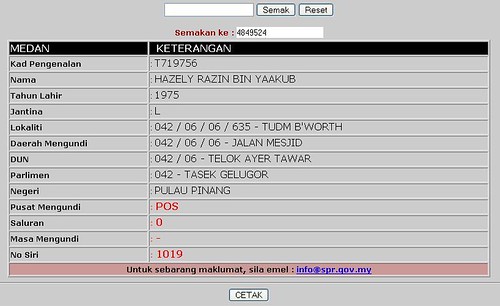
1. Vote in TUDM Butterworth as postal vote.
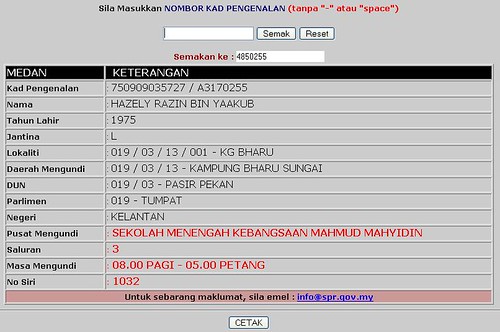
2. Then go back to Tumpat, Kelantan to vote again! Hurray!!!!!
Same name, same year of birth, same father’s name but different voting place? So he vote through postal vote and the vote will be sent to Tasik Gelugor, Pulau Pinang and then make a trip to go back to Tumpat, Kelantan to vote again? How fantastic!! Malaysia Truly Asia, Malaysia Boleh!
Updated 5.04pm :
I did a search to see if anybody posted on this before. Interesting, I found this blog here. I grabbed the photo from the site for all to see.
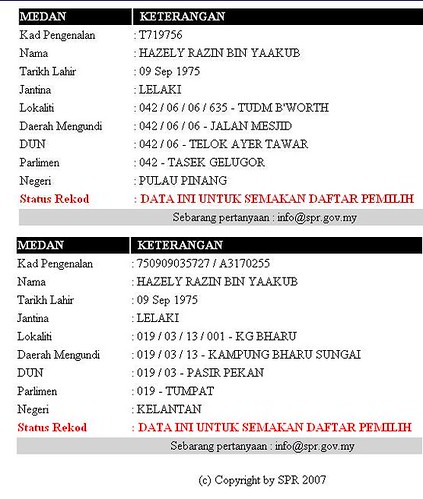
Okay, now if you see both pictures, the pictures I posted earlier I captured today from the latest SPR electoral roll website. It is in the latest format used by SPR to show the voter’s details. Then, the pictures above were captured sometime last year, and the details of the voter were shown in an older format. Do you notice that, comparing the latest format and and previous one, what is the difference? Yes! In the old format, SPR put ‘Tarikh Lahir’ but in the latest format only ‘Tahun Lahir’ is shown!!
Why SPR do this? (Change of format). I can only think of one reason. Say if anybody arguing on the identity of the voter using the current format, SPR easily can say ‘Well, maybe there are two different persons with same name but born in the same year. Possible right?’ But, referring to the old format, it it very unlikely for a person with the same name will be born on the very same day at two different locations??? Now, that’s Malaysia for you. 
Tuesday, March 04, 2008
为何女人要践踏女人?
| 为何女人要践踏女人? | |||||||||||
| Ong See Wei | 3月4日 中午12点54分 | |||||||||||
| 周紫琳是谁?一个女人,也是马华黄燕燕的秘书,同时也是马华女青年工作坊的主任。她标榜自己是女青年,这次代表马华去士布爹参选。她对选民有五大承诺,第五项为:提升女性权益及醒觉积,及推动女青年及女性选民参政。 很 讽刺,对不?这样一个口口声声自认为女权代表的“女人”,竟然为了争取选票,公然推出带有情色味道的广告版,影射对手郭素沁“贪新忘旧”爱上了壮壮的新 欢,抛弃了旧爱弱势男。路人甲乙丙丁看了都不舒服,她竟然还敢辩说不是侮辱女性,只是针对郭素沁一人,因此坚决没错,不会道歉,也不会拆。与此同时,还会 继续推出连环漫画广告牌。 我不明白,难道郭素沁不是女人吗,为什么侮辱她没问题,侮辱其它女性就不可以?如果我没记错,昨天周紫琳还公开对记者说虽然总部有指示她们把广告拆下,以免被行动党利用,但是她已决定还是会推出其他未曝光的广告牌。 周紫琳,你这样并不是在提升女权,而是在践踏女权。真是情何以堪。我庆幸我不是马华士布爹区会的党员,连连几届都出现口不择言的候选人。试问,他们该如何为你的任性善后?
|


 选 战才要进入第二周,国阵(马华公会)士布爹国会议席候选人周紫琳为了打击对手,上周五开始一口气在选区内十个地点设立带有性意味的漫画广告看板,这个漫画 以“贪新忘旧”为题,把郭素沁画成一个身穿鲜红色贴身裙子,脚穿红色高跟鞋的女人,遗弃“旧爱”(士布爹先生)后,向“新欢”(金銮镇先生)投怀送抱。
 郭素沁已经连任两届士布爹区国会议员,她在
Thursday, November 30, 2006
ANZ to Buy AMMB share
ANZ yesterday agreed to buy 11.4% of AMMB from AmcorpGroup Bhd, which is controlled by Tan Sri Azman Hashim (pic), for US$356 million (RM1.29 billion) at the premium of RM1.25 per share over Nov 29’s closing price of RM3.06.
The average price paid for the 24.9% would be RM3.625 a share, for a total of RM2.35 billion.
This follows an agreement last week for the Australian bank to take a 13.5% stake in AMMB at RM3.05 a share translating to a total of RM1.06 billion.
ANZ and Azman formalised the latest deal on the sidelines of the Eighth Malaysia-Australia Business conference in Kuala Lumpur on Nov 30, which was also graced by Australian Prime Minister John Howard.
This makes ANZ, which is Australia’s third-biggest lender, the largest shareholder in AMMB, boosting its presence in Asia. AMMB is Malaysia’s fifth largest financial institution.
In a statement on Nov 30, AmBank Group said the price was at a premium to reflect the dilution of Amcorp’s controlling interest in AMMB from 32.9% to 18.8% and ANZ’s active involvement at the board and management levels of AMMB.
It said the proposed equity participation would provide the group with the capital infusion to strengthen its balance sheet and enhance its banking operations in the local and international markets.
“The proposed transaction will enable ANZ to increase its stake in AmBank Group to a meaningful level, making it a long-term strategic partner which will contribute significantly to the business direction and strategies of the group,” it said.
It said the latest transaction would allow Amcorp to raise proceeds of RM1.29 billion to pare debts while retaining a significant holding of AMMB in line with Bank Negara Malaysia’s requirement for Amcorp to institutionalise its shareholdings in AMMB by May 2007.
Azman, who is AmBank group chairman, said ANZ’s international best practices as well as exposure to international products, banking systems and cross-border capabilities in Asia would create a unique growth opportunity for both parties.
“The partnership will also provide a strong foundation for advancing AmBank’s strategy to be one of Malaysia’s premier consumer and business-focussed banks,” he said.
Saturday, September 23, 2006
Calculation Sale & Purchase Agreements and Loan Agreement Legal Fees
STAMP DUTY ON TRANSFER
All transfer of property attracts Government Stamp Duty regardless whether the acquirer gives consideration for the transfer or not.
Value Of Property Rate Of Stamp Duty
RM1.00 to RM100,000.00. 1% from property value
RM101,001.00. to RM500,000.00. 2% from property value
RM501,000.00 and above 3% from property value
STAMP DUTY ON CHARGES
A charge on a property is an instrument created by statute, namely the National Land Code (NLC). It affords the Borrower a loan granted by a Licensed Financial Institution over the property charged. Stamp duty is calculated at the rate of approximately 0.5% of the loan amount.
SALE & PURCHASE AGREEMENT
Scale Percentage
1. First RM150,000 1%
2. RM151,000 to RM1,000,000 0.7%
3. RM1,000,001 to RM 3,000,000 0.6%
4. RM3,000,001 to RM 5,000,000 0.5%
5. RM 5,000,001 to RM 7,500,000 Negotiable but shall not exceed 0.4%
LOAN AGREEMENT
Scale Percentage
1. First RM150,000 1%
2. RM150,001 to RM1,000,000 0.7%
3. RM1,000,001 to RM 3,000,000 0.6%
4. RM3,000,001 to RM 5,000,000 0.5%
5. RM 5,000,001 to RM 7,500,000 Negotiable but shall not exceed 0.4%
STAMP DUTY ON CHARGE
Scale Percentage
Stamping of documents based on loan amount 0.5%
Note
Disbursements are chargeable in accordance with the value of the transaction and all fees attract 5% Government Service Tax (GST).
Friday, September 08, 2006
TOSHIBA --TECRA A8
(Toshiba)
Notebook PC
Processor: Intel Core Duo T2300 (1.66GHz)
Memory: 512MB RAM
Graphics: Intel Graphics Media Accelerator 950
Display: 15.4in LCD (1,280 x 800pixels)
Storage: 60GB hard disk, DVD/CD-RW combo drive
Connectivity: WiFi, Bluetooth 2.0, 56K modem, Gigabit Ethernet
I/O ports: Three USB 2.0 ports, PC Card Type II slot, SD Card slot, S-Video out, headphone jack, mic input
Operating System: Microsoft Windows XP Pro SP2
Dimensions (w x d x h): 36.8 x 26.8 x 3.69cm
Weight: 2.9kg
Price: RM5,399
Website: www.teledynamics.com.my
When buying a notebook for use in the office (or home office) and for multimedia needs, you really can’t go wrong with a Toshiba. Besides the quality and usual must-have connectivity options, most Toshiba notebooks give you performance and reliability. These notebooks may not always have that “wow” factor but they’re sturdy and reliable.
What you see
The Tecra is a bit of a heavyweight so I wouldn’t recommend it for those constantly on the go. For something in the office or home though, it should serve its purpose well. The 15.4in widescreen display has ample viewing space so that you can open several windows side-by-side. The screen is great for multitasking and work purposes especially for people like me who have no less than eight windows open at any time.
The trackpad is fine although I prefer to use the USB port to plug in my mouse. One drawback regarding using the three USB ports is that they’re situated at the back of the notebook. I thought most notebook manufacturers had stopped doing that. It really makes it hard to plug peripherals in each time you want to use your mouse, printer or even a USB drive. Plus, with the USB ports fighting for space at the back with the power jack and the LAN port, it’s definitely a tight squeeze.
It might have been better to put the USB ports at the sides like Toshiba did with its Satellite M30. The Tecra A8 has a good heat dispersion system. Even after using it for five hours it did not run hot. It could be because the heat vents are larger than average. The notebook also has a biometric fingerprint scanner for security reasons. This way you can secure your notebook and its contents using a password as well as your fingerprints. If you ever lose your notebook or if it gets stolen, at least you’ll know that the data is still secure.
Unfortunately, having to scan your fingerprint every time you switch on the notebook can get a bit tedious, especially after the 15th try when the notebook keeps rejecting your fingerprint scans for one reason or another.
What you hear
With such a wide screen, this notebook should be ideal for multimedia — music, movies and games. Unfortunately, while the screen is wide enough for watching movies comfortably, the built-in speakers are lacking. As such I would not recommend this notebook to those who want to listen to music unless you’re prepared to lug your headphones wherever you go. With good headphones, however, music played on the notebook sounded great. I didn’t like the jog dial for the volume control but then I’m probably just old-fashioned when I say I like a normal dial for controlling the volume.
Here, the jog dial also serves as a mute button when pressed.
What you get
I used the A8 to write this review in Microsoft Word while surfing the Internet, chatting on Google Talk and also watching a DVD. The battery lasted about two hours and 40 minutes. My advice is take your power cord with you so you can keep it plugged in. This is definitely not a machine you can take with you on appointments sans power cord.
With WiFi, Bluetooth, an SD card reader, DVD/CD-RW drive and three USB ports, you really have all you need for connectivity and to transfer files. I had no problems with the WiFi connection and the Bluetooth was a boon when moving files from one PC to another or even from my PDA to notebook and vice versa. All of which worked beautifully.
The number of USB ports was just ideal for me — for printer, mouse, USB drive — although once again I question their placement — altogether in one area at the back. To make matters worse, since my USB drive is a bit fat, I actually cannot use the USB port next to it. Perhaps a better idea would have been to have the USB ports split up in placement instead of having them all in one row.
What you need
Whether you should get this notebook or not depends entirely on what you want to use it for.
If you want mobility, then this isn’t the PC for you. If you want a games machine or a temporary replacement for your hi-fi speakers, then this isn’t it either. If all you need is a reliable machine for work and multimedia (and don’t mind too much bass in your music or don’t mind using headphones), then this machine is the one to check out.
It’s got just the right features and functions, besides security, reliability, an excellent heat dispersion system and a nice wide screen. All of this for less than RM7,000 is quite a good deal, in my opinion.
Pros: Does not run hot; biometric fingerprint scanner; Bluetooth
Cons: Weight; battery life; speakers; placement of USB ports.
Tuesday, September 05, 2006
My 1st Degree Convocation at UUM


Just to share my convocation with you all....
Still got 1 years time to go for me to receive my 2nd degree at UUM.
UUM Wait for me...... :)
Monday, September 04, 2006
THINKPAD T60 -- From IBM

THINKPAD T60
(Lenovo)
Business notebook PC
Processor: Intel Core Duo T2400 (1.83GHz)
Memory: 512MB DDR2 SDRAM
Graphics: Intel GMA 950, shared memory
Display: 14.1in LCD (1,024 x 768pixels)
Storage: 60GB hard disk, DVD/CD-RW combo drive.
Connectivity: WiFi (802.11a/b/g), Bluetooth 2.0, 56K modem, Gigabit Ethernet, I/O ports: Three USB 2.0 ports, PC Card Type II slot, ExpressCard/54 slot, 15-pin VGA port, mini S-Video out, headphone jack, mic input.
Operating System: Microsoft Windows XP Pro SP2
Other features: ThinkPad Shock-Mounted hard drive, spill-proof keyboard
Dimensions (w x d x h): 31.1 x 24.8 x 3.1cm
Weight: 2.32kg
Price: RM6,498
Website: http://www.lenovo.com/
ARE you the sort of person who accidentally drops notebook PCson a fairly regular basis (in which case, are you sure you’re doing it “accidentally”?). If you are, then the Lenovo ThinkPad T60 is the notebook for you. It’s one of those business class notebook PCs that have been designed to withstand the abuse normally associated with frequent travelling businessmen in nicely pressed suits.
Thanks to a choice of sturdy, scratch-resistant materials and no-nonsense design, the T60 absolutely reeks of quality. I’d use one to stop a bullet, if I had to. But simply being near indestructible is no longer enough. Nowadays, the security of your personal information and documents are as important as the survival of your notebook. And data security is one of the T60’s many tricks.
Soft advantage
Like all ThinkPads, the T60 comes with Lenovo’s ThinkVantage software utilities. At a press of a button, ThinkVantage gives you quick access to all the notebook’s bespoke security settings, power management settings, location managers (for various network settings), backup utilities and software updates for the T60.
While not essential, these tools do make it a lot easier to configure the T60 for different tasks in a hurry and to keep it in tip-top running condition. And if you’re not sure about anything, there’s a very comprehensive HTML user manual for quick reference. The T60 comes with a fingerprint scanner for secure login. While it works very reliably, the setup software recommends you configure it to work with at least two fingers —presumably in case you lose a digit or a whole hand.
And if you’re a systems administrator, you can make fingerprint recognition a requirement for other users when logging on to the T60. And if that wasn’t enough, you can even allocate space in its hard disk for a secure, encrypted disk image — so even if your hard disk is stolen, there’s no way to extract the data inside without a password.
These are just a few examples. I won’t go into more details but take my word for it — the ThinkVantage utilities are a significant part of the ThinkPad experience.
Peace of mind is always a good feature.
Built to go places
SECURE: Fingerprint scanners are the norm these days for logging in securely At about 2.3kg, the T60 isn’t a featherweight but is light and compact enough to fit into most backpacks or briefcases without much fuss. However, you won’t be worrying too much about knocking it about. It’s not to say that you can’t destroy a T60, it just requires more effort (or carelessness) to crack this nut.
Believe me, someone actually gave me a live demonstration, although I’d rather not try it with the review unit — just to be safe.There are a lot of neat touches that make the T60 easier to live with on the road — such as a night light (located above the LCD) that illuminates the keyboard if used in the dark. the T60 runs almost silently as well, which is nice.
There are also a huge number of useful “Fn+key” shortcut buttons to change everything from your WiFi status to your power management mode. The keyboard feels incredibly rugged and is a proper spill-proof design with drainage — pour stuff onto it and it’ll come out from the bottom. And if that’s not enough to convince you, Lenovo even has drainage statistics for fluids of different viscosity (Coke, milk, water, etc).
It’s really nice to type on and even all the secondary keys (the ones above the standard Qwerty section) are large. The T60 also has the famous ThinkPad Shock-Mounted hard drive system that parks the hard disk’s read head in the event of physical shock.
Its sensitivity can be adjusted, which is important because you don’t want the hard disk to park itself at the slightest movement (likely to happen if you’ve got it on your lap). Battery life is rated at up to six-hours per charge on standard batteries and nine hours with the extended nine-cell battery (which nicely slots into the optical drive bay).
In real-world tests, I managed about 4 hours and 15 minutes with the T60 – doing some web browsing (via WiFi), typing documents and occasionally listening to MP3s. You’d be able to get more life out of the T60 by turning off all wireless connections, disabling the hard disk shock protection sensors and performing tasks that don’t require constant access to the hard disk (allowing it to sleep).
In any case, it has one of the most extensive power-saving settings of any laptop I’ve ever seen.
More than just tough Like all Core Duo-based laptops, the T60 is really fast. Unless you absolutely need the extra speed, you won’t need anything faster than the base 1.83GHz model reviewed here. The 14.1in LCD is bright, has excellent contrast, good colours and very good viewing angles. It’s matte too, which rules out distracting reflections when used in brightly lit places.
However, it has a native resolution of just 1,024 x 768pixels — not quite enough for serious Photoshop usage or huge, multi-windowed video editing suites but enough for just about everything else. It’s loaded with an integrated Intel GMA950 graphics card, which isn’t fast enough for the latest PC games. However, its low power consumption does play a part in the T60’s fantastic battery life (the versions with discrete graphics chips have about 20% poorer battery life). This base model comes with a DVD/CD-RW combo drive rather than a full-blown DVD writer. A little disappointing, but you can upgrade for a small fee.
Conclusion
Rather than dazzling users with fancy colour schemes, exotic materials and superfluous accessories, the Lenovo ThinkPad T60 is a no-nonsense business notebook that places function over form — it impresses by virtue of being competent in all the things that really matter. With such comprehensive security and safety features, rock-solid construction and general peace of mind, the Lenovo ThinkPad T60 is a bulletproof proposition.
NoteBook -- Toshiba
Portege M500-P140 (Toshiba)
Ultraportable notebook
Processor: Intel Core Solo T1300 (1.66GHz, 667MHz FSB, 2MB L2 cache)
Memory: 512MB DDR2
SDRAM Graphics: Intel 945GM integrated graphics
Display: 12.1in WXGA TFT LCD
Storage: 80GB Serial ATA hard disk,
dual-layer multi-format DVD burner,
5-in-1 card reader (SD/MMC/MS/MS PRO/xD-Picture)
Connectivity: 802.11a/b/g Wireless LAN, 56K modem, 10/100 Ethernet, Bluetooth 2.0
I/O ports: 3x USB 2.0,
Firewire, external microphone, headphone jack, PC Card slot
Operating System: Microsoft Windows XP Home Edition
Dimensions (w x d x h): 29.9 x 22.5 x 3.4cm
Weight: 1.86kg Price: RM5,399

If notebooks are represented by the clothes they wear, the Toshiba Portege M500-P140 would be the one donning a classic navy blue business suit – one look at it and you’ll immediately notice that it’s all made for the travelling businessman.
In short, this goes to say that the M500 is built to be great for work and poor for play. Apart from being a capable workhorse, Toshiba has also packed quite a punch in this ultraportable by including business-class notebook features via its EasyGuard technology.
To judge a notebook by its cover, the M500 looks every bit as expensive as it costs. Taking into consideration that you can get a notebook with similar specifications (sans EasyGuard features) for about half the price, it would not be an understatement to say that the M500 is quite costly.
But to be fair, let’s just say you get what you pay for. From the chassis to the placement of its features and keys, the professional polish of this notebook is evident in all the M500’s sleek, chic and no-nonsense design.
What is not so obvious, however, is that the M500 is also carefully optimised for productivity.
For example, all its ports are conveniently located on both sides of the notebook, so you would not have to risk dislocating an arm during all those times you had to reach behind a notebook to plug in a USB device.
Keys to comfortable typing
If you’ve ever tried typing furiously with a notebook on your lap, you’ll notice that most notebook covers would start wobbling, and this makes the screen quiver – not very conducive for the busy businessperson who needs to get work done on the go.
The M500, with one of the most solid covers I’ve ever seen, will cause you no such misery. For an ultraportable, Toshiba has done right to achieve a comfortable weight balance with the M500. It is light enough that you can support it with one arm and heavy enough that it remains steady on a lap.
In addition, its full-sized spill-resistant keyboard is fast and responsive – easily one of the best I’ve seen and used on a notebook. The keyboard has great tactile feedback that allows you to type as fast as you ever could want, which I believe has an added advantage of putting businesspeople in a very productive mood for work.
Fast starter
If you have ever needed to be able to just whip out your notebook and get started on a spreadsheet, the M500 will make it happen – and in no more than 20 seconds from the time you start unzipping your notebook bag, in fact.
However, this is only possible if you left your notebook in hibernate mode. I would imagine that the M500 would boot up faster if Toshiba did not include all those EasyGuard applications to run at start-up.
But of course, all those applications are part and parcel of the EasyGuard package, which offers protection, security, connectivity and optimisation features for business users. One of these features is the hard disk protection system, which has an integrated 3D-axis motion sensor that can automatically detect whenever the notebook is in an unsafe situation.
Another feature is the biometric fingerprint scanner, which allows you to create a protected folder to store files – that can only be exclusively accessed with your fingerprint verification. I suppose this gives some measure of security for business people who like to keep sensitive data on their notebooks, though I’m not sure how tamperproof it really is.
You can probably live without these features, business-class user or not. But like the biometric scanner – there’s just something so darn cool about swiping your finger to log on to Windows instead of having to type in a long and complicated password. As an added note, Toshiba claims that the M500 is rather durable as it is made from shock-absorbing materials, but I’d highly recommend against putting this to test.
Conclusion
Toshiba seems to have got it right by making the M500 a great companion for the travelling businessperson. It may be a tad expensive for but if cost is not a constraint, you can even opt to spend more on the P1401 model instead. You’ll lose the “Smart Indigo” colour that gives the M500 that “navy blue business suit” touch, but gain better performance – starting with a Core Duo processor.
Speed-wise, the M500-P140 performs more or less within its means. It’s not blazingly fast, so unless your primary job involves crunching some big numbers, the P140 version is enough to get the job done.
